KeyCaps™ Font Set:
Show Readers Exactly Which Key to Press
"Press Ctrl+Shift+Esc" is easy to misread. A picture of the actual keys isn't.
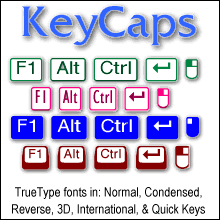
Our KeyCaps™ fonts let you put realistic keyboard keys straight into your documentation, training materials and help guides. Type a few characters and you get clean, professional key symbols for Enter, Shift, Tab, Backspace, currency signs and even mouse buttons. You don't need to draw graphics or paste screenshots.
Ideal for:
- Software manuals and user guides
- Training materials and classroom handouts
- Keyboard shortcut reference cards and cheat sheets
- Help files, tutorials and technical writing
- Accessibility and computer-literacy instruction
A complete set, not a partial one:
Many keycap fonts leave out symbols or skip international characters. KeyCaps™ covers practically every key on the keyboard, plus:
- Special keys: Enter, Shift, Tab, Backspace and more
- Currency symbols and other common characters
- Two- and three-button mice in every state (normal and each button pressed)
- An international version covering most Western European languages
Six styles to match any document:
- Black on white
- White on black (reversed)
- Black on white condensed
- 3D
- 3D International
- Quick Keys™
Every style includes both square and rounded-corner keys.
Easy to use: an included PDF manual shows exactly how to build almost any keyboard symbol.
PDF embedding supported, so your keycaps look right wherever your documentation goes.
Your readers learn faster when they can see the key. Get KeyCaps™ today.
At a glance:
- Includes: six KeyCaps typefaces
- Format: OpenType (TrueType outlines)
- Styles: square and rounded-corner keys in every font
- Symbols: mouse, currency, Tab, Enter, Shift, Backspace and more
- Mice: two- and three-button mice in all states
- International: Western European language support
- Embedding: embeds in PDF files
$79.50
TrueType fonts

Elfring Fonts, Inc.
4N899 W Mary Dr
St Charles, IL 60175